The call
A relative of mine lives abroad. On the shelf sits a Raspberry Pi 5 running Home Assistant, M.2 board, NVMe SSD, all neatly arranged. No SSH set up, because I had never needed it. No chance of just dropping by. Twelve hundred kilometres is an awkward distance for “go have a look whether the little light is blinking”.
And then the call: the interface is gone.
I open the log and see a wall of the same line, dozens of times over:
sqlite3.OperationalError: unable to open database fileOpen and shut, I thought. The recorder database is toast. That diagnosis was completely wrong, and it took me two days to notice. The log was a witness who testified with great confidence and accused the wrong party.
Why the database was innocent
SQLite reports what SQLite sees: I tried to open the file, it didn’t work. About the cause the message stays silent, and that is exactly where the trap sits. You read “database file” and picture a corrupted database. The file was perfectly fine. The ground underneath it had gone.
The filesystem had been remounted read-only. The kernel had decided that by itself, after the drive threw an I/O error. ext4 has a documented error handler for this, errors=remount-ro, and on the vast majority of systems it is the default: the moment the disk stops answering reliably, Linux stops writing. A protective move with plain logic behind it. Better to write nothing at all than to write nonsense.
For Home Assistant that has an ugly consequence. The process kept running. It sat in RAM, processed states, served integrations, produced errors. Writing was the one thing it could no longer do. Not the recorder, not restore_state, not a config reload, and eventually not even a clean delivery of the frontend. What reached me as “UI dead, database broken” was a system still talking while it could no longer write anything down.
That mix-up is the real lesson of the whole episode. A read-only filesystem announces itself in the logs as a database problem. What it means is a hardware signal arriving three layers up as an application error.
I dutifully did the obvious things first anyway. Check the database, try to replace the database, walk through the recorder options. It is the kind of work that feels productive and gets you nowhere. In hindsight, what should have made me suspicious is that I couldn’t even delete the database. That was a write as well. The system held the answer out to me the whole time and I took it for an error message.
The advisory that fit too well
Shortly before, the system had updated to Home Assistant OS 18. And sitting in my own platform was an advisory, severity “strongly advised against”, category hardware, with a title that read like my ticket:
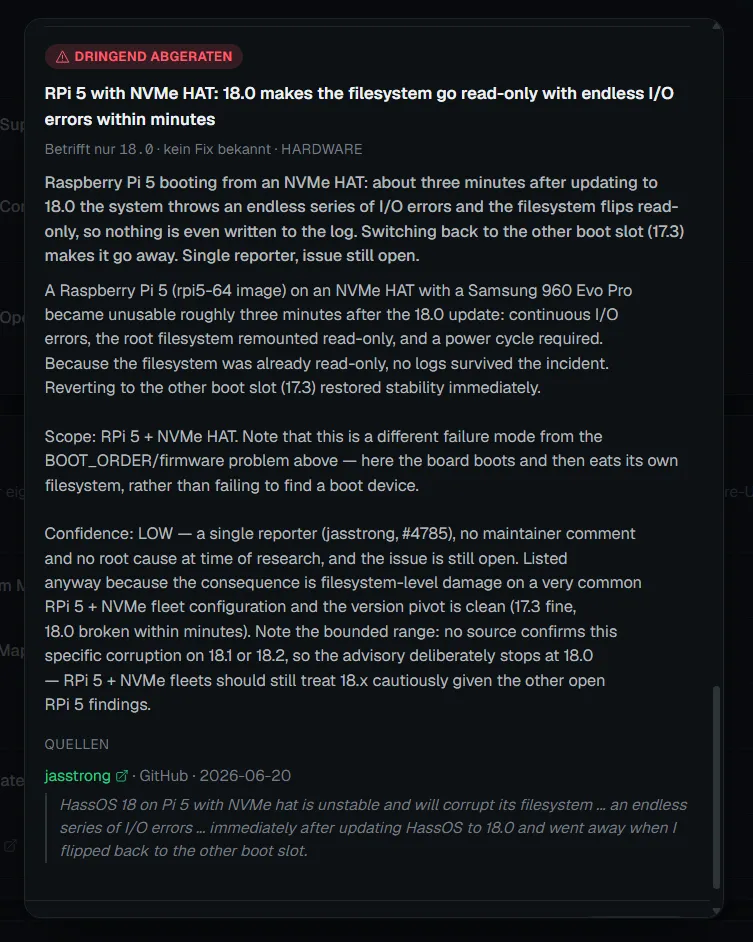
RPi 5 with NVMe HAT: 18.0 makes the filesystem go read-only with endless I/O errors within minutes
I read that card three times. A Raspberry Pi 5 on the rpi5-64 image, an NVMe on the HAT, and roughly three minutes after the update to 18.0 the box was unusable: continuous I/O errors, root filesystem remounted read-only, power cycle required. One sentence in the advisory hit particularly close, because I had already tripped over that very effect: “Because the filesystem was already read-only, no logs survived the incident.” Someone had written down my story months before I lived it, including the bit about the log that stops writing.
A second 18.0 advisory sat in the same list: the wired Ethernet link flaps every six to ten seconds, traced back to a regression in the macb driver of the new 6.18 kernel, with a freezing UI and integrations dropping offline. For someone whose interface happens to be unreachable, that sounds fairly inviting too.
So, the obvious move. Downgrade to 17.3. It worked remotely because I had pulled the updates beforehand and uploaded them into my own platform as a safeguard, which paid off at precisely that moment.
The problem stayed. Same picture, same errors, just a different version number in the header.
This is where the theory breaks, on a detail I almost skimmed past. For the reporter in the advisory, switching back to the other boot slot restored stability immediately. For me the failure came straight back after the downgrade. Same symptom, same measure, different outcome: the first hard signal that I was chasing the wrong culprit despite a warning that fit perfectly.
Honesty means adding that the advisory flagged this itself. Its confidence level was explicitly marked low: a single reporter, jasstrong, issue #4785 in the operating-system repo, no maintainer comment, no root cause analysis. I read that, took note of it, and then pushed it aside for two days because the theory fit so nicely.
That is the actual trap, and the advisory is blameless in it. A symptom can have several causes, and a hit that lands on the exact line is still a hypothesis, just one in a good suit. For anyone with that precise setup, Pi 5 with an NVMe HAT and freshly on 18.0, the advisory remains a warning worth taking seriously; the reporter over there had a Samsung in the machine, hardly a bargain-bin drive. It simply happened to be someone else’s case.
Dead ends like this usually vanish from incident write-ups without a word. In the end everybody tells their diagnosis as a straight line, and the colleagues with the same problem feel stupid for spending two days going in circles. Being proven wrong at least got me further than any confirmation would have: from then on I knew the cause sat below the operating system.
The witness who falls silent too early
The breakthrough came somewhere I expected nothing at all. I pulled up the journal of the previous boot, the thing journalctl -b -1 spits out. Pure desperation, I had simply run out of better ideas.
And there was nothing. More precisely: there was something, and then it stopped.
The entry broke off in the middle of normal operation. No shutdown, no error, no goodbye. The last timestamp lay several hours before the errors Home Assistant reported afterwards. The log ended while the system was demonstrably still running.
It took me a moment to understand what I was looking at. A log can end in two ways: the system goes off, or the system can no longer write. The first was ruled out, because messages kept coming after that point. So only the second was left. From that timestamp on, even journald could not get anything onto the disk. The system’s own logger, the one service whose entire job is writing things down, had gone quiet while everything else carried on.
That is the hardest piece of evidence in this whole story, and it consists of absence. Not of an entry, but of the entries missing from one precise moment onwards. Anyone searching for error messages alone will never find it. You have to look at the gap.
Once you have seen it, everything rearranges itself. The dozens of SQLite errors were a late aftershock. The actual incident lay hours earlier, and the only trace it left is the point where the recording ends.
The detail that was already the answer
There was a second clue that I wrote off as a curiosity for far too long.
A clean reboot didn’t help. The system came up, ran for a while, and slid back into the same state. Only pulling the plug, actually cutting the power and starting again, bought some quiet.
That difference deserves to be taken seriously, because it is almost the complete diagnosis. A software state, a hung process, a jammed mount, a full cache: none of it survives a reboot. A storage controller that has wedged itself does. It keeps its power through a warm restart and carries its broken state across. When cutting the power is the only thing that helps, the problem is not in the operating system. It is underneath the operating system.
I spent two days hunting software while the hardware stood there every single time with its hand up, saying: it’s me.
The culprit
The SSD in that machine was a no-name model, NXM-256 in the 2242 form factor. Drives like that are astonishingly cheap, and if you go looking for the reason you find it on the datasheet: a DRAM-less MAXIO controller. No cache of its own, optimised aggressively for price.
The rest was sad legwork. I read through the product reviews for that exact model, and there it was, several times, from different people, in different words: dropouts, I/O errors, systems going read-only. Exactly my failure pattern, publicly visible, months before my phone call.
That is the most uncomfortable part of this story. The answer had been sitting in the review box of an online shop the entire time. Two stars, indifferent spelling, technically spot on, and I went and read logs for two days instead.
I replaced it with a WD Green SN350. Nothing exciting, and deliberately not the fastest model. What counts is a controller from a manufacturer willing to put its name on it, plus a low power draw. The second point matters more on the Pi 5: the official M.2 board supplies only limited power, and a hungry consumer NVMe can run straight into the instability you were trying to avoid. It has been quiet since.
What actually helped here, and what didn’t
I write this blog for a product, so let me be straight about the part it played.
The HA Fleet Manager agent stayed reachable while the UI was dead. That let me restart remotely, run the downgrade and, above all, keep reading the logs. Without SSH it was the only channel into the system. That is the entire contribution, and it is enough for me.
No heroics there. The agent didn’t repair the SSD, it didn’t take the diagnosis off my hands, and it wouldn’t have saved me from the dead end either. It prevented exactly one thing, namely that the last remaining option would have been “drive over there”. At twelve hundred kilometres that is worth a lot and still nothing more than that. What such access looks like when you build it properly is something I wrote up in detail under remote maintenance without VPN and without an open port.
Two things I take into my own practice. First, my view of cheap storage hardware has grown distinctly less friendly since this case. Saving thirty euros on the SSD of an installation meant to run for years buys you a debugging session worth several times that. For integrators there is the added problem that they stand behind the part longer than the manufacturer does. Second: everything I push out into reflexes that live outside the server would have kept running through those two days. The Pi was dead; the lights didn’t have to be.
And the real point
Remote maintenance without out-of-band access has a property you only notice in an emergency: every restart costs you evidence. Whatever wasn’t written to disk is gone with the reboot, and rebooting is exactly what people do when something is stuck. Three restarts often means the trail wiped three times.
Which is why that truncated journal entry was so valuable. It was the last piece of evidence that had survived a reboot. And it said nothing at all.
It just stopped.